Image Processing and OpenCV in Computer Vision
Image Processing and OpenCV in Computer Vision
Image Processing and OpenCV in Computer Vision are essential technologies used in Artificial Intelligence, Deep Learning, robotics, medical imaging, and intelligent automation systems. Image processing helps computers analyze and improve images, while OpenCV provides powerful tools for real-time Computer Vision applications.
Image Processing and OpenCV in Computer Vision are widely used in:
- Face recognition systems
- Medical image analysis
- AI surveillance systems
- Self-driving cars
- Industrial automation
- Robotics applications
- Smart security systems
- Augmented reality platforms
Understanding Image Processing and OpenCV in Computer Vision helps students build Artificial Intelligence systems capable of image analysis, object detection, and real-time visual automation.
What is Image Processing?
Image Processing is a technique used to:
- Analyze images
- Enhance image quality
- Extract visual information
- Detect patterns
Image processing converts raw images into:
- Meaningful data for Artificial Intelligence systems.
Why Image Processing is Important
Image Processing and OpenCV in Computer Vision are important because they help:
- Improve image quality
- Detect objects accurately
- Enhance AI visual systems
- Enable automation
- Support real-time image analysis
Many modern Artificial Intelligence applications depend heavily on image processing.
Types of Image Processing
Main image processing operations include:
- Image resizing
- Image filtering
- Edge detection
- Image segmentation
- Color conversion
- Thresholding
These techniques improve Computer Vision performance significantly.
Digital Images in Computer Vision
Digital images are represented using:
- Pixels
Each pixel stores:
- Numerical color information
Examples:
- Grayscale images
- RGB color images
Computer Vision systems process images mathematically.
RGB Images in OpenCV
RGB images contain:
- Red channel
- Green channel
- Blue channel
Each color value ranges between:
- 0 to 255
Example
[255, 0, 0]This represents:
- Pure red color
Grayscale Images in Computer Vision
Grayscale images contain:
- Intensity values only
Benefits:
- Reduced computational complexity
- Faster image processing
Grayscale images are widely used in Computer Vision tasks.
OpenCV in Computer Vision
OpenCV stands for:
- Open Source Computer Vision Library
OpenCV is one of the most popular libraries for:
- Image processing
- Video analysis
- Computer Vision development
Benefits:
- Real-time processing
- Extensive AI support
- Cross-platform compatibility
Installing OpenCV in Python
pip install opencv-pythonOpenCV is widely used in Artificial Intelligence development.
Reading Images Using OpenCV
Import OpenCV
import cv2Read Image
image = cv2.imread("image.jpg")Display Image
cv2.imshow("Image", image)OpenCV simplifies image processing significantly.
Image Resizing in OpenCV
Image resizing changes:
- Image dimensions
Benefits:
- Faster processing
- Reduced memory usage
- Better AI model optimization
Resize Example
resized = cv2.resize(image, (300,300))Resizing improves Computer Vision performance.
Image Cropping in OpenCV
Cropping extracts:
- Specific image regions
Applications:
- Face recognition
- Object detection
- Medical imaging
Crop Example
crop = image[50:200, 50:200]Cropping helps focus on important visual regions.
Color Conversion in OpenCV
Color conversion changes:
- Image color formats
Example:
- RGB to Grayscale
Convert to Grayscale
gray = cv2.cvtColor(image, cv2.COLOR_BGR2GRAY)Grayscale conversion reduces processing complexity.
Image Filtering in Computer Vision
Filtering removes:
- Noise
- Unwanted patterns
Benefits:
- Better image quality
- Improved object detection
- Enhanced AI predictions
Gaussian Blur in OpenCV
Gaussian Blur smooths images and reduces noise.
Gaussian Formula
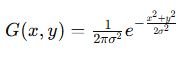
Gaussian filtering improves image quality significantly.
Blur Example
blur = cv2.GaussianBlur(image, (5,5), 0)Blurring helps reduce image noise.
Edge Detection in Computer Vision
Edge detection identifies:
- Object boundaries
- Shapes
- Structural details
Applications:
- Autonomous vehicles
- AI surveillance
- Medical imaging
Canny Edge Detection
Canny Edge Detection is one of the most popular edge detection algorithms.
Edge Detection Example
edges = cv2.Canny(image, 100, 200)Edge detection improves object recognition significantly.
Thresholding in Image Processing
Thresholding converts images into:
- Binary images
Benefits:
- Easier object separation
- Improved segmentation
Threshold Formula
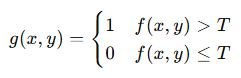
Thresholding simplifies image analysis.
Thresholding Example
_, thresh = cv2.threshold(gray, 127, 255, cv2.THRESH_BINARY)Thresholding is widely used in Computer Vision systems.
Image Segmentation in Computer Vision
Segmentation divides images into:
- Multiple meaningful regions
Applications:
- Medical imaging
- Satellite image analysis
- Industrial automation
Segmentation improves detailed image understanding.
Contour Detection in OpenCV
Contours identify:
- Object shapes and boundaries
Applications:
- Shape recognition
- Object tracking
- AI automation systems
Contour Example
contours, _ = cv2.findContours(thresh, cv2.RETR_TREE, cv2.CHAIN_APPROX_SIMPLE)Contour detection improves object analysis significantly.
Face Detection in OpenCV
OpenCV supports:
- Real-time face detection
Applications:
- Smart attendance systems
- AI security systems
- Smartphone authentication
Haar Cascade in OpenCV
Haar Cascade is a popular algorithm for:
- Face detection
- Object recognition
Benefits:
- Fast detection
- Real-time performance
Video Processing in OpenCV
OpenCV processes:
- Real-time video streams
Applications:
- AI surveillance
- Autonomous systems
- Smart monitoring platforms
Video Capture Example
cap = cv2.VideoCapture(0)OpenCV enables real-time Computer Vision applications.
Applications of Image Processing and OpenCV
Image Processing and OpenCV in Computer Vision are used in:
- Healthcare AI
- Face recognition
- AI surveillance systems
- Autonomous vehicles
- Industrial automation
- Robotics
- Smart city systems
OpenCV powers many modern Artificial Intelligence applications.
Image Processing in Artificial Intelligence
Artificial Intelligence systems use image processing for:
- Visual understanding
- Intelligent automation
- Pattern recognition
- Real-time image analysis
Image processing is essential for Computer Vision systems.
Advantages of OpenCV
- Open-source library
- Real-time image processing
- Extensive Computer Vision support
- Cross-platform compatibility
- Strong AI integration
Disadvantages of OpenCV
- High computational requirements
- Complex optimization for large-scale systems
- Limited built-in Deep Learning capabilities
AI engineers often combine OpenCV with Deep Learning frameworks.
Challenges in Image Processing
Image processing systems may face:
- Poor image quality
- Lighting variations
- Real-time processing complexity
- Large memory usage
- Dataset imbalance
Proper optimization improves Artificial Intelligence system performance significantly.
Best Practices for OpenCV Development
- Use high-quality image datasets
- Normalize image sizes properly
- Apply preprocessing techniques carefully
- Optimize filtering methods
- Use GPU acceleration for large-scale systems
- Monitor AI performance regularly
Good practices improve Computer Vision system accuracy significantly.
Future Scope of OpenCV and Image Processing Skills
Image Processing and OpenCV in Computer Vision are essential for:
- Artificial Intelligence
- Robotics
- Healthcare AI
- Smart automation
- Security systems
- Autonomous vehicles
- Industrial AI systems
AI Engineers with strong Computer Vision and OpenCV skills are highly valuable in modern industries.
Key Takeaways
- Image processing improves image quality and analysis.
- OpenCV is one of the most popular Computer Vision libraries.
- Edge detection and thresholding improve object recognition.
- OpenCV supports real-time image and video processing.
- Image processing powers many modern Artificial Intelligence systems.
Frequently Asked Questions (FAQs)
What is Image Processing in Computer Vision?
Image Processing analyzes and improves images for Artificial Intelligence systems.
What is OpenCV?
OpenCV is an open-source library used for image processing and Computer Vision applications.
Why is edge detection important?
Edge detection helps identify object boundaries and shapes in images.
What is thresholding in image processing?
Thresholding converts images into binary format for easier analysis.
Which industries use OpenCV?
Healthcare, robotics, security, manufacturing, and autonomous vehicle industries use OpenCV extensively.